
Imagine this. Your employer in Qatar has confirmed your work visa is done. You book your flight, pack your bags, get to the terminal, only to find out the airline denies you boarding because the system shows your visa is still “Under Process.” This happens more often than you would think.
A quick two-minute Qatar Visa Check online before traveling tells you exactly where your visa stands. Whether you are checking a visa for work, family visit, or vacation, the process is free, instant, and works 24 hours a day.
This guide covers all four official ways to check your Qatar visa status, what every status result actually means and what to do about it, common errors and how to fix them, and how the QVC portal works for South Asian applicants. In case you are already in Qatar and would like to check your QID status, that is a separate procedure that is covered in this section.
What Is a Qatar Visa Check and Why Does It Matter?
A Qatar visa check is an official inquiry in the MOI (Ministry of Interior) Qatar system that shows the current status of your visa application or active visa. When you run a check, the system shows your status, visa type, validity dates, sponsor details for work visas, and whether the visa has been used. Three situations where people check:
- Before traveling: Confirm that the visa is approved before booking a flight or making hotel reservations. Airlines can deny boarding if the system shows an invalid or pending status.
- After applying: Track whether an application submitted by an employer or sponsor is approved, still processing, or has an issue that needs to be fixed.
- During a stay in Qatar: Verify remaining visa validity to avoid overstay fines, or confirm that a visa has been successfully converted to a residence permit.
How to Check Qatar Visa Status Online — 4 Official Methods
Pick the method that matches your situation. All four pull from official MOI data.
Method 1: MOI Qatar Portal (Best for Everyone)
This is the most reliable method and works for all visa types. The official MOI portal is the primary source of all visa status data in Qatar.
Step 01: Open any browser and go to the official MOI page.
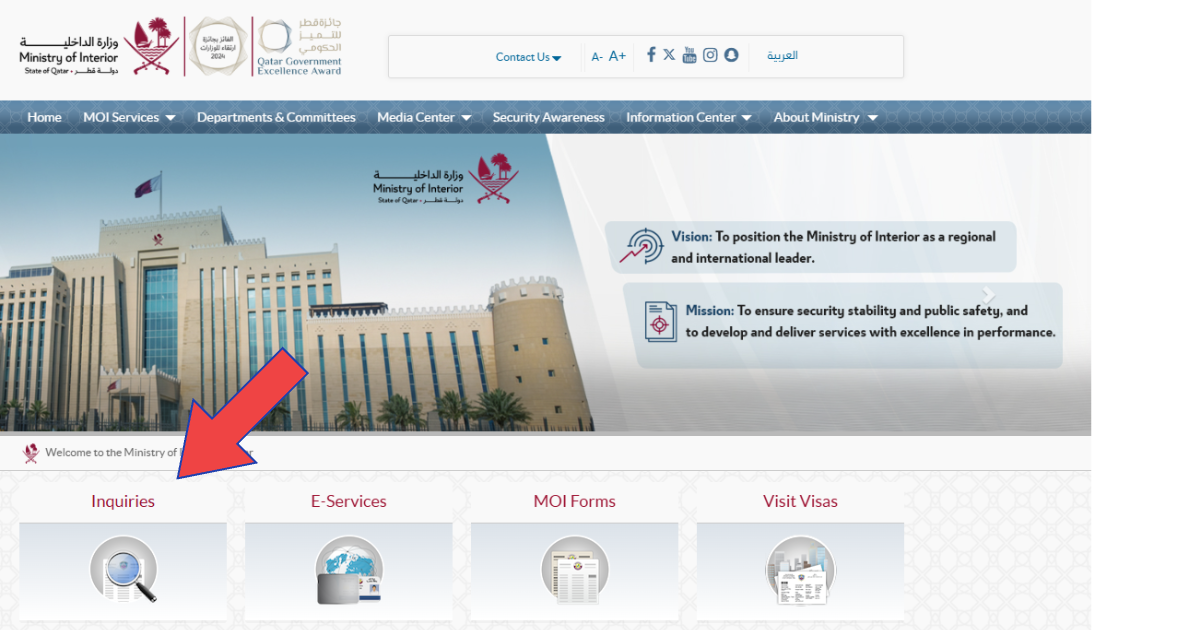
Step 02: Click on the “Inquiries” option on the homepage.
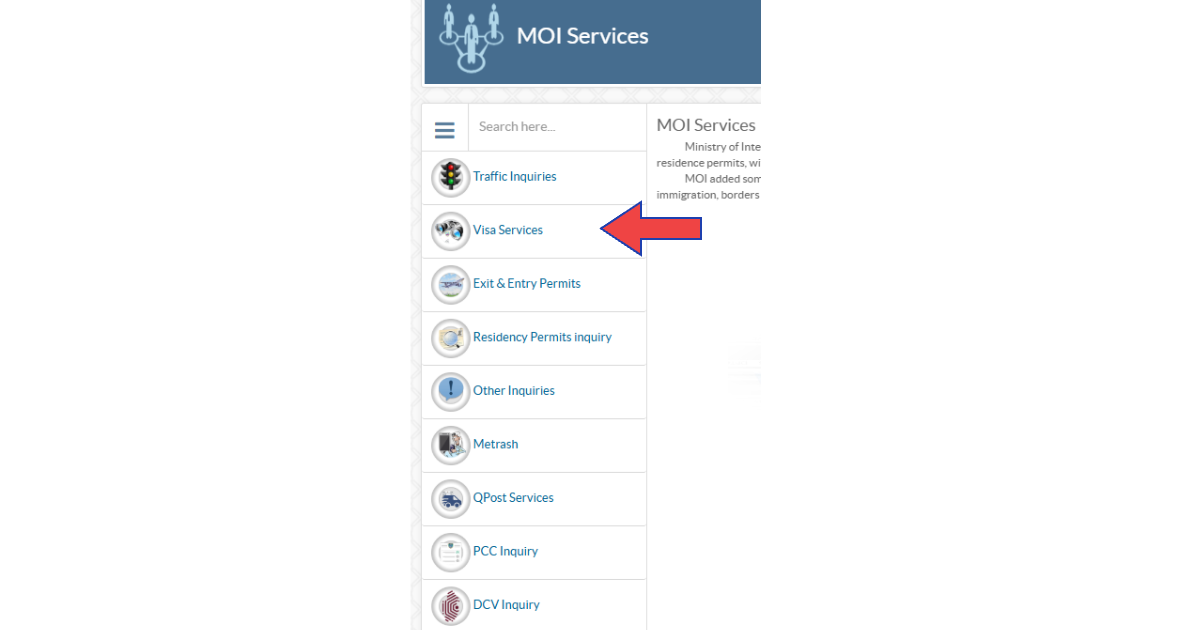
Step 03: Select “Visa Services” from the left side menu.
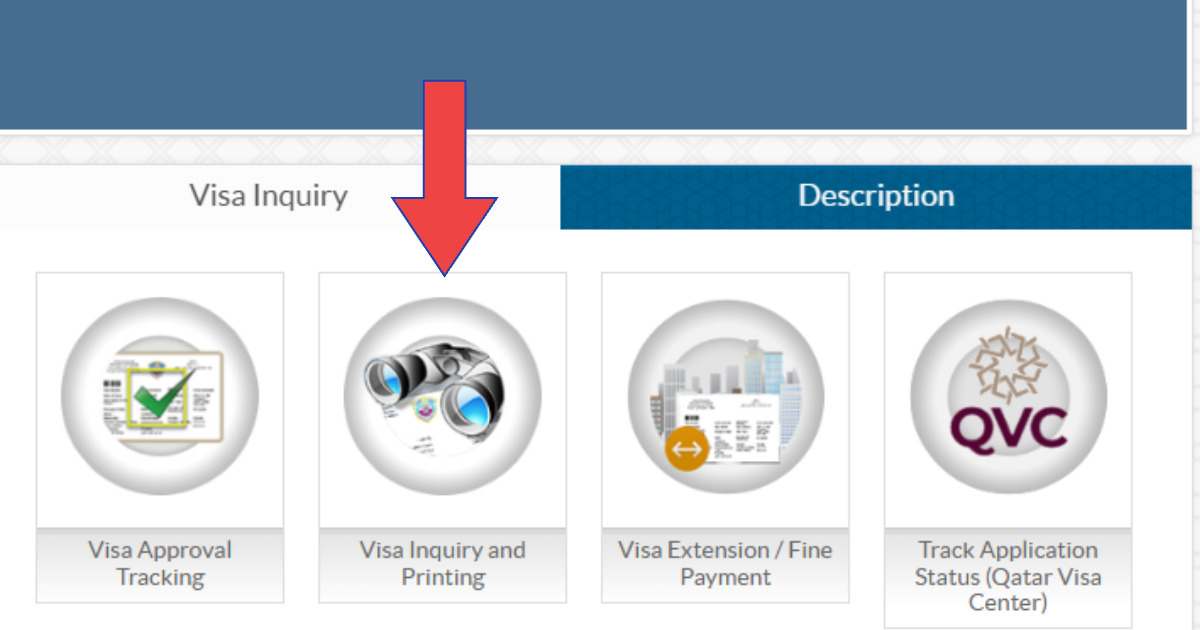
Step 04: Click “Visa Inquiry and Printing.”
Step 05: Enter your 15-digit visa number or passport number in the required field.
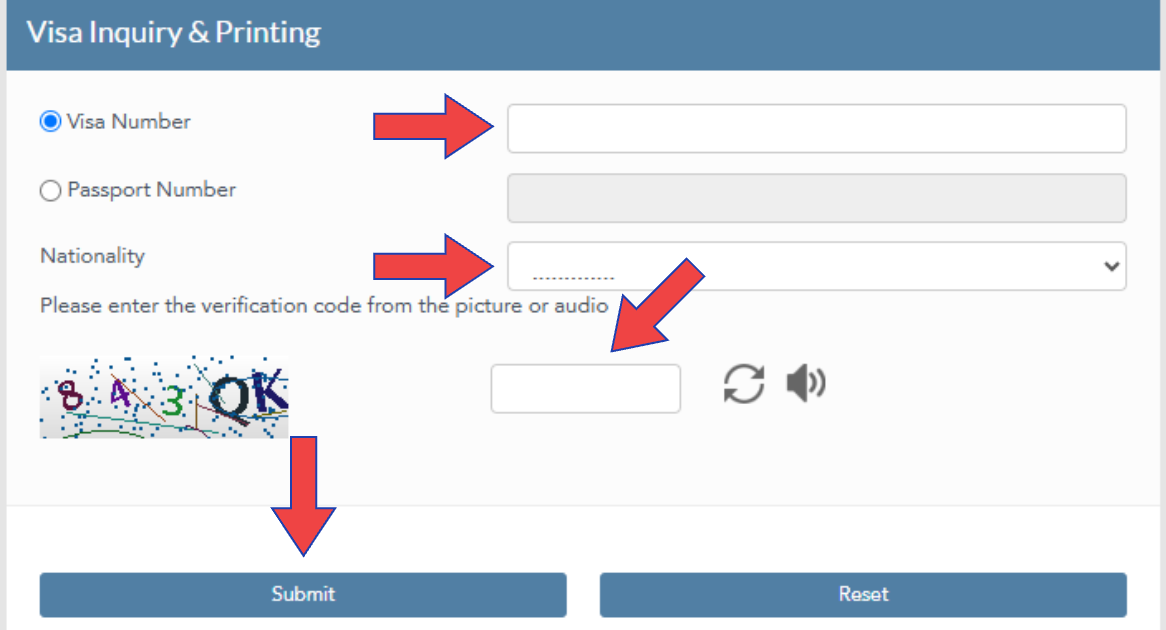
Step 06: Select your nationality from the dropdown list.
Step 07: Complete the CAPTCHA code exactly as shown.
Step 08: Click “Submit” and your visa status appears instantly.
Method 2: QVC Portal — For Pakistan, India, Bangladesh, Nepal, Sri Lanka, Philippines
If you are applying from one of the 6 designated countries you must track your specific biometric and medical clearance stages directly on the official QVC platform before final MOI approval.
- Visit the official QVC website and select your language and country.
- Click on the “Track Application” button on the homepage.
- Enter your visa, passport, and file reference numbers.
- Complete the simple captcha and click ‘Submit.’
- View your medical results and biometric status instantly.
Method 3: Metrash App — Best for Qatar Residents
The Metrash app is the official MOI Qatar mobile application. It is the fastest method for people already living in Qatar who need to check a current visa or track an in-progress application.
Step 01: Download the official Metrash from the Google Play Store or Apple App Store.
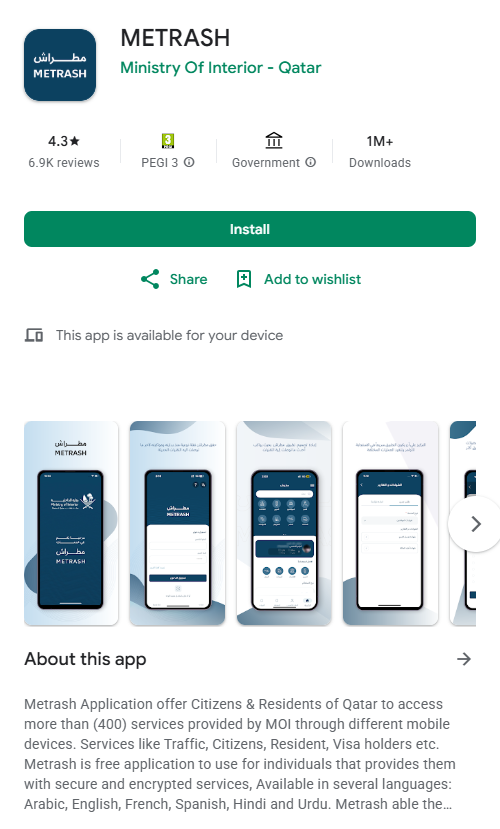
Step 02: Log in using your QID number and registered mobile number
Step 03: Go to “Visa Services.”
Step 04: Tap on “Visa Follow Up.”
Step 05: Select your visa from the list and tap “Download” to save the approved visa to your phone.
The Metrash app also lets you check your QID status, pay for MOI services, and track Qatar traffic violations from the same place. It is the most complete single tool for residents managing multiple Qatar government services.
Method 4: Qatar Embassy or MOI Helpline (Offline)
For those without reliable internet access or with issues the portal cannot resolve:
MOI Qatar Helpline: Call 44068888 (available in Arabic and English). Provide your passport number and nationality and the operator will check your status in the system live.
Qatar Embassy or Consulate: Visit or contact the nearest Qatar Embassy in your country. They can verify your visa status using passport details and send you a written confirmation when you need an official document for a visa issue.
What Each Qatar Visa Status Result Means
This is the most important section. Most people who check their visa status do not know what the result actually requires them to do. Here is every status with clear action.
| Status | What It Means | What To Do |
| Approved / Issued | Visa accepted and ready | Print from moi.gov.qa and proceed with travel plans |
| Under Process | MOI is reviewing the application | Wait 1 to 7 business days and check again |
| Rejected | Application was denied | Contact your sponsor to get the rejection reason and reapply after fixing it |
| On Hold | Additional processing or document verification needed | Wait — your sponsor needs to follow up with MOI |
| Cancelled | Visa terminated by sponsor or immigration authority | Contact your sponsor immediately |
| Expired | Visa validity period has passed | Apply for renewal or a new visa before entering Qatar |
| Used Inside Country | Visa already activated for a stay inside Qatar | Normal status for residents already in the country |
| Transferred to Resident | Visa converted to a residence permit (QID) | Check your QID status to confirm the residence permit is active |
| Documents Not Finalised | Errors in submitted information are causing a delay | Employer must correct and resubmit the documents |
| Not Found | No record found for the details entered | Double-check your passport number — employer may not have submitted yet |
One status worth understanding closely: “Rejected” does not always mean the visa cannot be reapplied for. The most common rejection reasons are an expired commercial registration on the employer’s account, a failed medical exam, or incomplete documents. Fix the specific issue and the employer can resubmit.
Qatar Visa Types — Quick Reference
Knowing your visa type helps you use the right portal and interpret results correctly.
| Visa Type | Validity | How to Apply |
| Tourist or Visit Visa | 30 days, extendable for 30 more days | Individual applies online or through sponsor |
| Family Visit Visa | 30 days, extendable monthly up to 6 months | Qatar resident sponsor applies through MOI or Metrash |
| Work or Employment Visa | Tied to contract, typically 2 years | Employer applies on behalf of employee through MOI |
| Visa on Arrival | 30 days for eligible 102 nationalities | Received at Hamad International Airport on arrival |
| GCC Resident Visa | 30 days, extendable | GCC residents with approved profession apply via Hayya or on arrival |
| Residence Permit (QID) | 1 to 5 years depending on category | Employer or sponsor applies — becomes your Qatar ID (QID) |
| Transit Visa | 72 to 96 hours | Applies to passengers transiting through Doha |
Citizens of 102 countries can receive a visa on arrival at Hamad International Airport. Holders of valid visas or residence permits from the Schengen area, USA, UK, or Canada may also qualify for a visa on arrival even if their nationality is not on the standard eligible list.
Once a work visa converts to a residence permit, it becomes a Qatar ID (QID). The visa status in the MOI system will show “Transferred to Resident” and you need to track the QID separately.
GCC residents can apply through the Hayya portal before travelling. Qatar updated its approved professions list in 2026, adding medical, engineering, and IT categories while restricting certain labour categories. Residents of the GCC should verify their profession qualifications before arriving.
Common Qatar Visa Check Errors and How to Fix Them
“No Records Found” on MOI portal: The most common cause is a wrong passport number entry. Enter it exactly as it appears in your physical passport, with no spaces, no hyphens. A second cause is that the employer has not yet submitted the application. If your employer says it was submitted but the portal shows nothing after 48 hours, call the MOI helpline on 44068888 to confirm.
“Incorrect Captcha” error: The CAPTCHA is case-sensitive. Type each character exactly as shown. If the text is hard to read, refresh the page for a new code.
Visa stuck “Under Process” for more than 7 days: For work visas through QVC, check the QVC portal separately as a medical or biometric step may be pending. For other visa types, your sponsor should contact MOI directly. Processing during the peak season can take up to 10 business days.
Rejected due to sponsor’s expired commercial registration: The employer’s MOI account must be in good standing. If their trade licence or commercial registration has lapsed, the visa cannot be approved until the employer resolves it.
Portal not loading: Clear your browser cache or try a different browser. The MOI portal blocks most VPN connections, so disable any VPN before accessing the site.
Visa on Arrival — Do You Need to Check in Advance?
If you are from one of the 102 eligible countries, you will receive your visa at the airport on arrival with no advance check needed. However, two situations require preparation before you land:
GCC residents: Your profession on your GCC residence permit must appear on Qatar’s approved professions list. Qatar updated this list in 2026, tightening restrictions on certain labour categories. If you are unsure whether your profession qualifies, apply through the Hayya portal before travel. Both the Hayya pre-application and the visa on arrival cost QAR 100, but the Hayya route removes border uncertainty entirely.
India, Pakistan, and select other nationalities: A 2026 update requires travelers from India, Pakistan, Iran, Thailand, and Ukraine to book accommodation through the Discover Qatar website for the duration of their stay. Confirm this requirement is met before boarding.
Frequently Asked Questions
How do I check my Qatar visa status by passport number?
Go to the official MOI portal, click ‘Inquiries,’ select ‘Visa Services,’ then ‘Visa Inquiry and Printing.’ Enter your passport number, select your nationality, complete the CAPTCHA, and click ‘Submit’. Your status appears immediately with no login required.
Is Qatar visa check free?
Yes. The MOI portal visa inquiry is completely free. No account, registration, or payment is needed to check your status.
How long does Qatar visa processing take?
Tourist visit visa: 2 to 5 business days. Family visit visa: 5 to 10 working days. Business visit visas: 3 to 7 business days. Work visas through QVC take longer because of the additional medical and biometric steps before MOI final approval.
Can I check someone else’s Qatar visa status?
Yes. The MOI portal does not require login. Anyone can enter a passport number or visa number to check status. This means employers, sponsors, and family members can all check on behalf of an applicant.
What does “Under Process” mean on the Qatar visa check?
It means MOI officials are reviewing the application. For most visa types this resolves within 1 to 7 business days. If it stays “Under Process” beyond 10 days, the employer or sponsor should contact MOI directly.
Can I print my Qatar visa from the MOI portal?
Yes. If your status shows Approved or Issued, the same Visa Inquiry and Printing page on MOI has a print option. The printed copy is accepted by airlines and at immigration.
Final Thoughts
A Qatar visa check takes under two minutes and can save you from a missed flight, an unnecessary airport wait, or a fine for an overstaying visa. The MOI portal is your starting point for any status inquiry. It works for all visa types, requires no login, and is available at any hour.
For work visas from Pakistan, India, Bangladesh, Nepal, Sri Lanka, or the Philippines, the QVC portal is the place to track your medical and biometric steps before the MOI approves the final visa. Check both portals, not just one.
If your status shows anything other than “Approved” or “Under Process,” contact your sponsor the same day. Do not wait. “Rejected,” “Cancelled,” and “On Hold” statuses all need your sponsor to take action on the MOI side before anything else can move forward.

Haris Khan is the lead content expert at TheEmiratesGuides.com, where he oversees the documentation of UAE visa processes, employment opportunities, and government services. With a commitment to factual integrity and real-time updates, he provides the technical expertise necessary to guide readers through the complexities of life and work in the UAE.