
A missed visa expiry, an unexpected cancellation notice, or just wanting to know if your entry permit came through. These are the moments when you need to Check Your UAE Visa Status fast. The good news is that both official portals are free, require nothing more than your passport number, and return results in under two minutes.
Before you open any portal, there is one rule that fixes most problems before they start. The UAE runs two completely separate immigration systems. Dubai visas are obtained through GDRFA. Visas for every other Emirate are processed by the ICP. Using the wrong one is why most people see ‘No Record Found’ when their visa is perfectly fine. Once you know which system issued your visa, the rest is straightforward. You can also verify the status of your UAE visa directly using the resources on this page.
Use the Right Portal: Dubai vs All Other Emirates
The portal you need depends on where your visa was issued, not where you currently live or work.
Dubai visas: Use the GDRFA. Covers all visas issued by Dubai mainland companies and Dubai free zones.
All other Emirates ICP is used. Covers Abu Dhabi, Sharjah, Ajman, Ras Al Khaimah, Fujairah, and Umm Al Quwain.
Not sure which issued yours? Check your visa sticker or entry permit. The issuing authority is printed on it. If you still cannot tell, start with ICP and then try GDRFA. One of them will have the record. The UAE government’s official visa tracking page also lists the full breakdown.
| Visa Issued In | Portal | Website |
| Dubai (mainland or free zone) | GDRFA Dubai | smart.gdrfad.gov.ae |
| Abu Dhabi | ICP | smartservices.icp.gov.ae |
| Sharjah, Ajman, RAK, Fujairah, UAQ | ICP | smartservices.icp.gov.ae |
| Not sure | Try both | Start with ICP, then GDRFA |
Check UAE Visa Status by Passport Number
Most people have their passports but no file numbers. Both portals accept passport numbers as the main input and the check is completely free. No login, no Emirates ID needed.
Important: Several unofficial websites charge for what is a free government service. Never pay to check your visa status. Use only the ICP and GDRFA portals.
On ICP (Non-Dubai Visas)
For applicants seeking entry permits in Abu Dhabi, Sharjah, Ajman, Umm Al Quwain, Ras Al Khaimah, or Fujairah, tracking your visa progress through the official ICP portal is very simple.
- Visit the official ICP webpage directly.
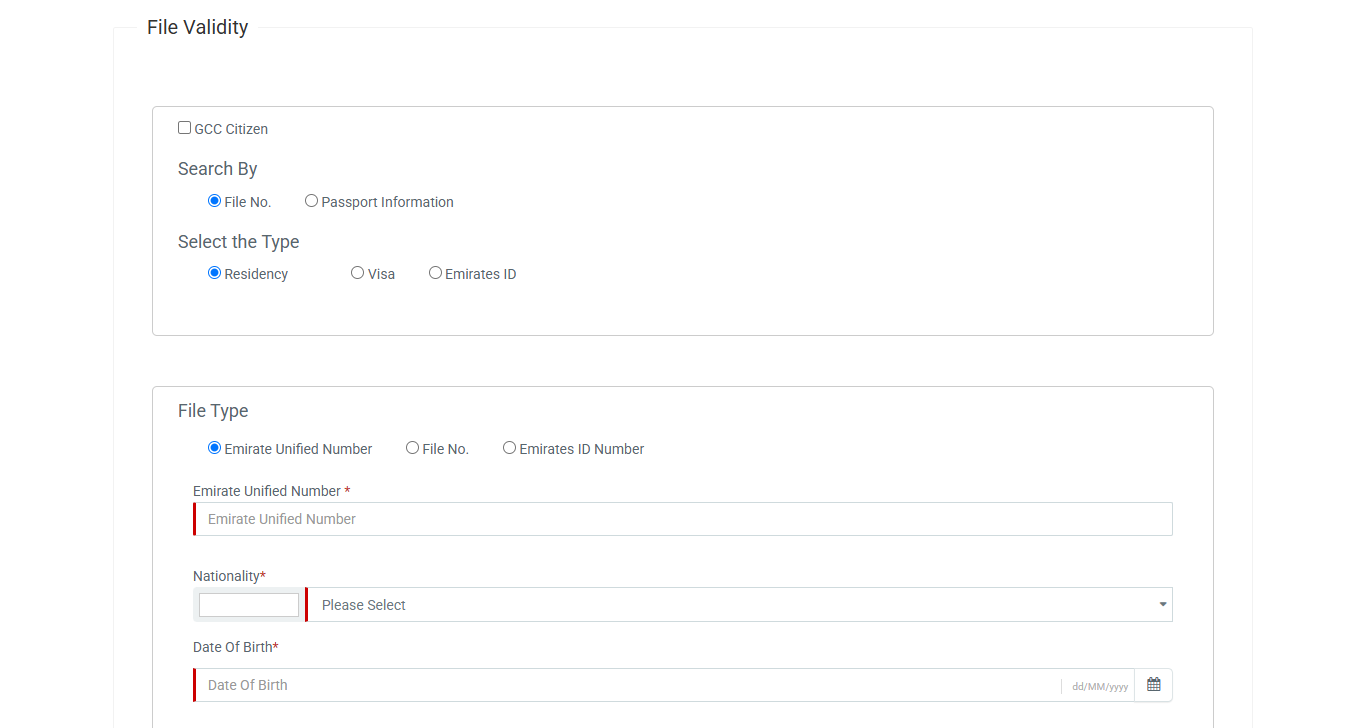
- Select the ‘Passport Information’ option and click on ‘Visa’.
- Type in your passport number, expiry date, and current nationality.
- Hit the ‘Search’ button to instantly view your application status.
On GDRFA (Dubai Visas)
Those who want to track their Dubai entry permit can do so on the official GDRFA website.
- Open the direct GDRFA tracking page in your browser.
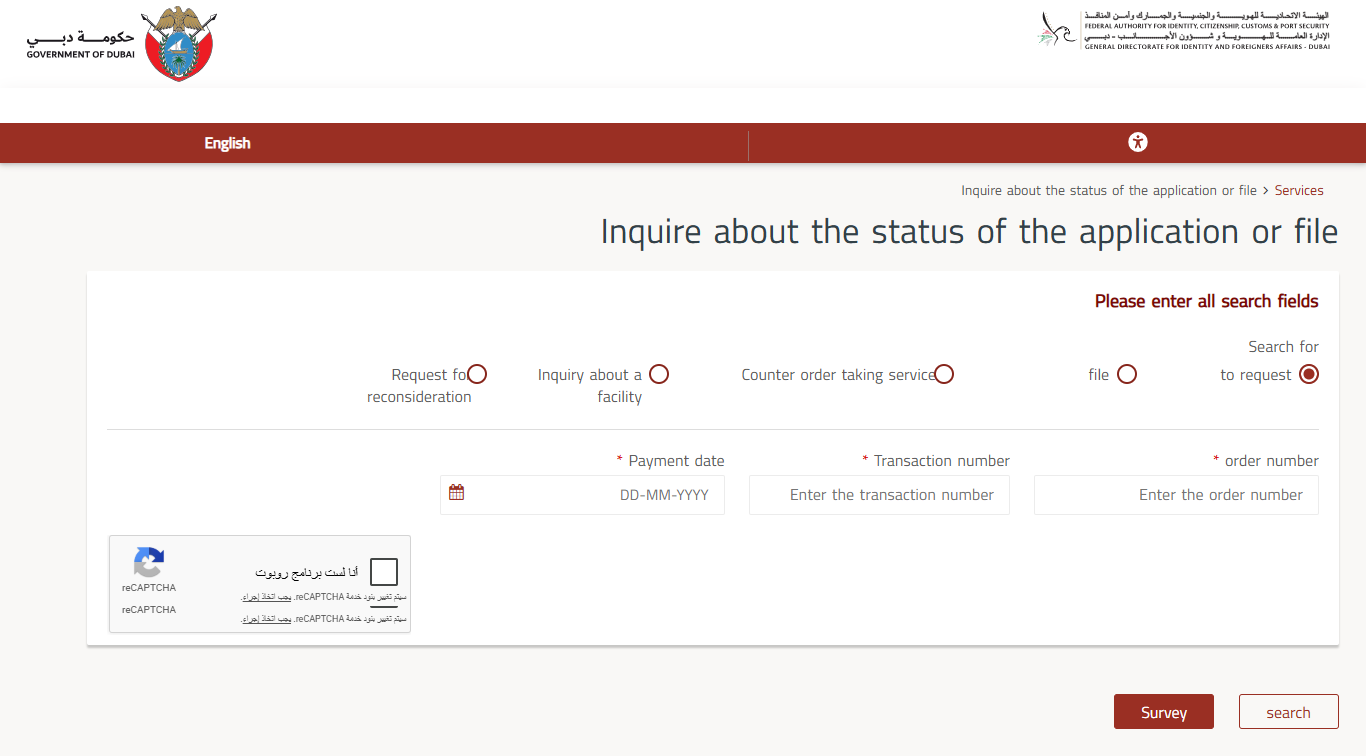
- Provide your specific order number, complete transaction ID, and the exact submission date.
- Pass the quick security captcha, and press the ‘Search’ button to review your current progress.
What is a UID Number?
The UID (Unified Identification Number) is a permanent immigration ID printed on your Emirates ID, entry permit, or residence visa. Unlike a passport number, it never changes even when you renew your passport. If your passport number returns no results, search by UID instead. Often, it solves the problem instantly.
Check UAE Residence Visa Status
Residents usually need one of two things: to see how much time is left on their current visa, or to track a renewal they have already submitted.
Check Current Validity
Enter your passport number on ICP (non-Dubai) or GDRFA (Dubai) along with your nationality and date of birth. The result shows your visa type, issuance date, and expiry date. Your visa expiry and your Emirates ID expiry date are always the same. If one is close, both need renewal together.
Track a Renewal Application
- Go to the official ICP portal and click on ‘Smart Services.’
- Select ‘Emirates ID Services’ then ‘Application Status.’
- Enter your PRAN number from the typing centre receipt, or your existing Emirates ID number.
- The portal shows which stage your renewal is at, from ‘Under Process’ to ‘Dispatched.’
For Dubai renewals, check GDRFA first. It updates the stamping and passport collection status up to 24 hours before ICP. If your residency is still in process, see what to expect while waiting for residency.
Check via ICP Smart App
Step 01: Download the UAEICP App from Google Play or App Store.
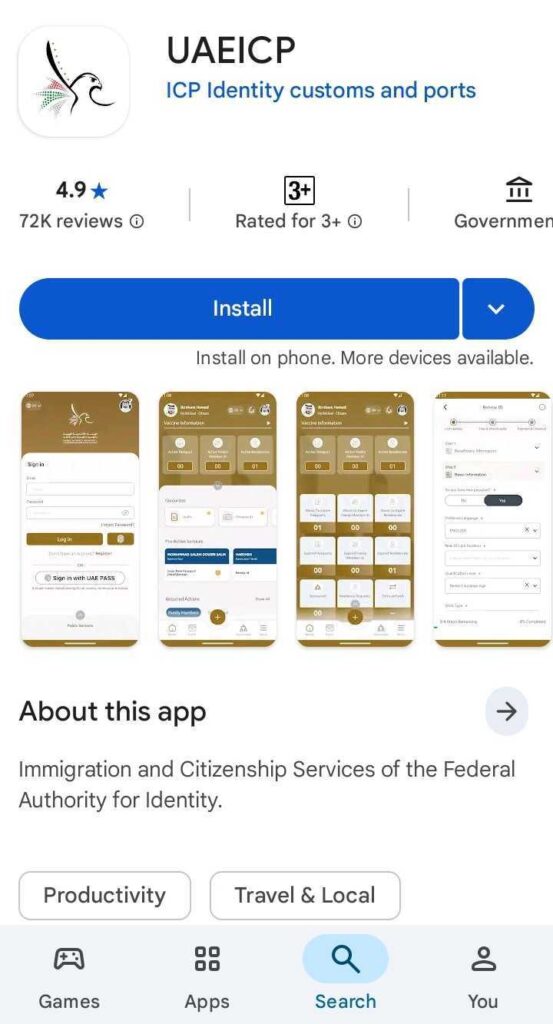
Step 02: Log in with UAE Pass or use the guest option.
Step 03: Tap ‘ID Card Services’ then ‘Application Status.’
Step 04: Enable push notifications to get an alert the moment your status changes.
Check UAE Employment Visa Status
An employment visa in UAE has two stages: the entry permit first, then the residence visa stamp after medical and Emirates ID biometrics.
Entry Permit Stage
Your employer’s HR or PRO should give you an application reference number. Enter it on the ICP website under ‘Application Status.’ If you were not given one, use your passport number on the ICP portal to check whether the entry permit has been issued or is still under process.
Residence Visa Stage
Once inside the UAE and after completing biometrics, track your visa through ICP using your PRAN. For Dubai-based employment, use GDRFA which shows passport stamping status and collection availability before ICP updates.
Work Permit Status
The work permit is a separate document from the visa and is tracked through MOHRE website. Everything about the UAE labour card including how to check its status is covered separately. Your UAE residence visa and work permit are tied together. When one is renewed, the other must be renewed as well.
Check UAE Tourist and Visit Visa Status
Tourists check before arrival to confirm approval and again while inside the UAE to track their expiry. Overstay fines in the UAE are AED 50 per day. Checking takes two minutes and can save you hundreds of dirhams.
Use ICP for non-Dubai tourist visa and GDRFA for Dubai visitor visas. Enter your passport number along with your nationality and date of birth. One thing many people miss: most visit visas are valid from the date of entry, not from the date of issue. A 30-Day visa issued two weeks before your flight still gives you 30 days to land.
If you have any outstanding UAE visa fines on your record, clear those before applying for an extension. Extensions must be applied for while the visa is still valid.
| Visa Type | Valid From | Overstay Fine |
| 30-day visit visa | Date of entry | AED 50 per day |
| 60-day tourist visa | Date of entry | AED 50 per day |
| 90-day multiple entry | Each entry date | AED 50 per day |
| Transit visa | 48 to 96 hours from entry | AED 50 per day |
Check UAE Golden Visa Status
The Golden Visa is 10-year residency for investors, entrepreneurs, specialists, and outstanding graduates. Status checks follow the same portal logic as any residence visa.
Non-Dubai: Use the official ICP portal with your passport number, UID, or file number.
Dubai: Use GDRFA portal which has a specific Golden Visa tracking section under ‘Smart Services.’ GDRFA also lets you book an in-person appointment to follow up on a Golden Visa application.
If you have UAE Pass set up, your Golden Visa appears digitally under ‘Government Documents’ alongside your Emirates ID. Full details about Golden Visa eligibility and renewal are covered separately.
All Methods at a Glance
| Method | What You Need | Best For |
| ICP Website (icp.gov.ae) | Passport number, PRAN, or Emirates ID | All non-Dubai visas |
| GDRFA Website (smart.gdrfad.gov.ae) | Passport number, nationality, DOB | Dubai-issued visas only |
| ICP Smart App (UAEICP) | UAE Pass or guest login | Real-time push notifications |
| GDRFA Dubai App | Passport number or file number | Dubai visa on mobile |
| Call ICP: 600 522 222 | PRAN or passport number | Portal not working |
| Call GDRFA: 800 5111 | Passport or file number | Dubai visa phone enquiry |
| MoHRE (mohre.gov.ae) | Work permit or file number | Work permit status only |
What Each Status Message Means
| Status | What It Means | What to Do |
| Under Process | Application under review | Wait, no action needed |
| Approved | Visa or permit approved | Book biometrics if new, collect passport if renewal |
| Active or Valid | Visa currently valid | Note expiry and set a reminder |
| Expired | Visa validity ended | Renew now, 30-day grace period may apply |
| Cancelled | Visa no longer active | Exit UAE or apply for a new visa |
| Rejected | Application declined | Check reason code, re-apply or file objection within 30 days |
| Pending Documents | ICP needs more files | Upload within 7 days or application closes |
Common Problems and Fixes
| Problem | Likely Cause | Fix |
| No Record Found | Wrong portal | Switch between ICP and GDRFA |
| No Record Found | Passport number typo | Re-enter exactly as printed, check for leading zeros |
| No Record Found | Old passport used | Use passport linked to current visa, or try UID |
| Status not updated | Real-time lag | GDRFA updates up to 24 hours before ICP for Dubai visas |
| Visa shows cancelled unexpectedly | Internal visa transfer | Call ICP 600 522 222 to confirm |
| Portal not loading | High traffic | Try off-peak hours or use the mobile app |
If your visa shows cancelled and you did not request it, call ICP on 600 522 222 immediately. This sometimes happens during an internal visa transfer where the new visa is being processed at the same time. It is also worth checking whether a UAE travel ban has been placed alongside the cancellation.
Final Thoughts
The wrong portal and a passport number typo account for most failed visa checks. Fix those two and almost every status inquiry resolves in under a minute.
For residents, set a reminder 60 days before your visa expiry. Renewals require biometrics, typing centre visits, and processing time. Leaving it to the last week under deadline pressure is avoidable. If your visa is due for cancellation rather than renewal, the UAE visa cancellation process covers how to exit correctly and keep your record clean.
Frequently Asked Questions
How do I check my UAE visa status online?
Use ICP portal for all Emirates except Dubai. Use GDRFA for Dubai-issued visas. Enter your passport number, nationality, and date of birth. The check is free and takes under two minutes.
Why does it say No Record Found when I check my visa?
The most common reason is using the wrong portal. Dubai visas only appear on GDRFA. All other Emirates only appear on ICP. The second most common reason is a typo in the passport number, especially a missing leading zero. Try using the other portal if re-entering your number still gives no results.
Can I check UAE visa status by passport number?
Yes. Both the ICP and GDRFA portals accept passport number as the main search input along with nationality and date of birth. No file number, login, or Emirates ID is needed for a basic status check.
What is a UID number and when do I need it?
UID stands for Unified Identification Number. It is a permanent immigration number printed on your Emirates ID, entry permit, or residence visa sticker. It stays the same even between passport renewals. If your passport number returns no results on the portal, search by UID instead. It is usually the most reliable input available.
Is the UAE visa status check free?
Yes. Both ICP and GDRFA provide completely free visa status checks. Several unofficial websites charge for this but there is no reason to use them. Always check directly on the official government portals.

Haris Khan is the lead content expert at TheEmiratesGuides.com, where he oversees the documentation of UAE visa processes, employment opportunities, and government services. With a commitment to factual integrity and real-time updates, he provides the technical expertise necessary to guide readers through the complexities of life and work in the UAE.